> For the complete documentation index, see [llms.txt](https://devcenter-help.nhn-commerce.com/llms.txt). Markdown versions of documentation pages are available by appending `.md` to page URLs; this page is available as [Markdown](https://devcenter-help.nhn-commerce.com/guide/base-information/structure/godomall-architecture.md).
# 고도몰 아키텍쳐(Architecture)
Request의 처리순서 Controller 등의 동작 방법과 디렉토리 구조 등 고도몰의 전반적인 아키텍쳐에 대한 내용입니다.
## 📌 Request 처리 순서
1. 사용자의 요청은 `route`로 전달 되어 고도몰에서 처리할 준비를 합니다.
2. `Application`은 솔루션 구동에 필요한 리소스를 준비하고 요청을 처리할 `Controller`를 찾아서 실행 시킵니다.
3. `Controller`는 사용자의 `Request`를 처리하고 템플릿을 찾아 화면에 보여질 데이터를 전달합니다.
4. 템플릿은 `Controller`로 부터 데이터를 전달 받아서 데이터를 설정한 뒤 `Controller`로 HTML 스트링을 반환합니다.
5. `Controller`는 템플릿과 데이터가 처리된 HTML 스트링을 화면에 출력합니다.
## 📌 Route의 동작
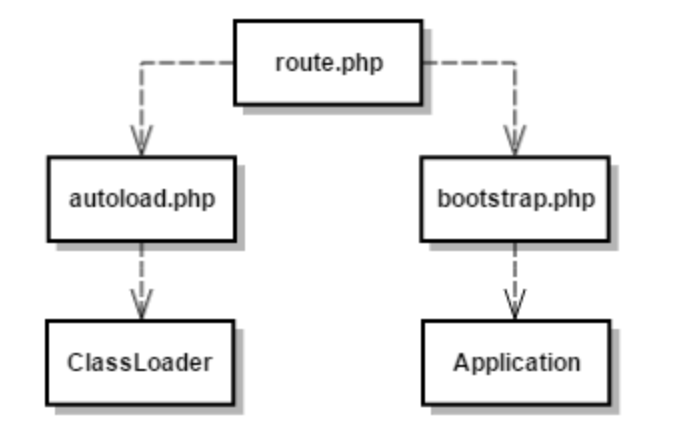
* 사용자의 요청은 모두 `사용자 소스 디렉토리(User Source Directory)` 내 `route.php` 에서 받은 뒤 처리됩니다.
* `autoload.php`는 ClassLoader를 이용하여 `원본 소스 디렉토리(Base Source Directory)` 및 `사용자 소스 디렉토리(User Source Directory)` 아래의 클래스를 생성하여 로드합니다.
* `bootstrap.php`는 Application 생성 후 필요한 리소스를 로드합니다.
## 📌 Application의 동작
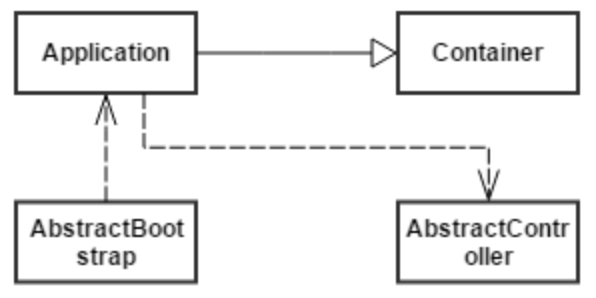
* `bootstrap.php`에서 `Application` 객체를 생성합니다.
* `Application` 객체가 생성되면 `AbstractBootstrap`을 상속받은 클래스를 로드하여 객체를 모두 실행합니다.
* `Bootstrap`에 필요한 클래스의 객체 생성 후 `Application` 컨테이너에 주입시킵니다.
* `Application`의 실행 준비가 완료되면 사용자 요청을 처리한 `Controller`를 찾아서 요청을 처리하도록 합니다.
## 📌Controller의 동작
* `Interceptor`에서 템플릿 레이아웃 설정, 글로벌 변수 설정, 통계 데이터 측정, 보안 및 인증과 같은 전역에서 이루어져야 하는 작업을 처리합니다.
* 사용자가 작성한 `MyController::pre()` 메소드가 실행됩니다.
* 사용자가 작성한 `MyController::index()` 메소드가 실행됩니다.
* 사용자가 작성한 `MyController::postHandle()` 메소드가 실행됩니다.
## 📌 View의 동작
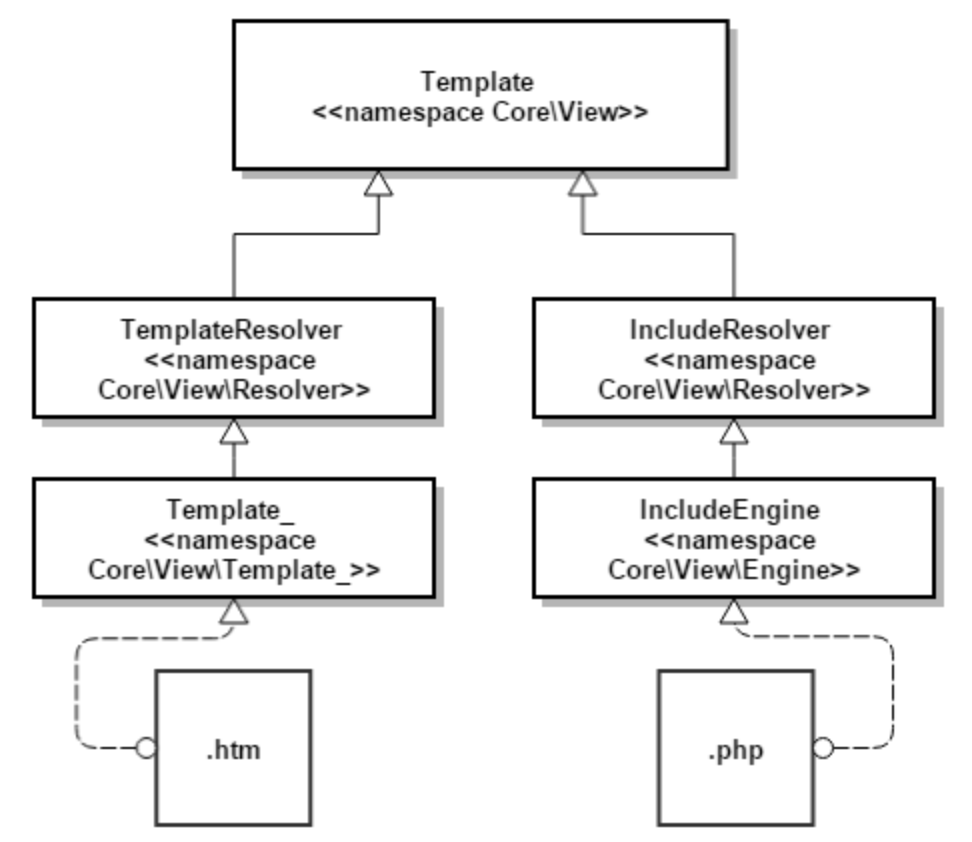
* 컨트롤러에서 호출한 View 엔진인 Template\_를 토대로 템플릿 엔진을 구성합니다.
* 템플릿 엔진의 종류
1. Template\_ 엔진 : `사용자` 스킨 처리
2. Include 엔진 : `관리자` 스킨 처리
## 📌 Class Loader
#### Class Loader 소개
* 고도몰은 클래스의 `FQN(Fully Qualified Name)`을 이용하여 `class` 파일을 자동으로 `include` 하는 `autoload` 시스템을 사용합니다.
* `Classloader`는 `사용자 소스 디렉토리(User Source Directory)` 내 `route.php` 에서 정의된 `Class`를 사용할 수 있도록 설정합니다.
* `PHP`에서는 `Classloader`를 `Loader Stack`에 여러개 등록할 수 있고, `Stack`의 순서대로 `Classloader`가 동작하여 `Class`를 찾습니다. 하지만, `고도몰` 에서는 하나의 `Classloader`를 사용하며, 내부에서 여러개의 `ClassPathResolver`를 등록하여 `Loader Stack`을 구현하고 있습니다.
{% hint style="info" %}
Fully Qualified Name란?
네임스페이스의 완전한 이름으로 아래의 예에서 볼 때 `Framework\ClassLoader\ClassLoader`, `Framework\Http\Request`을 의미합니다. 또한 반드시 네임스페이스와 물리적인 디렉토리의 경로가 동일해야 `Classloader`가 정상 실행됩니다.
{% endhint %}
#### Class Loader 동작
1. `Classloader`가 `사용자 소스 디렉토리(User Source Directory)`의 `module`에서 `class`를 먼저 검색하고, 없으면 `원본 소스 디렉토리(Base Source Directory)`에서 검색을 합니다.
2. `class`가 `사용자 소스 디렉토리(User Source Directory)`의 `module`에서 검색되면 `원본 소스 디렉토리(Base Source Directory)`의 `class`는 무시됩니다.
3. 원본 소스 중 확장 가능한 `class`는 `사용자 소스 디렉토리(User Source Directory)`의 `module`에 원본 소스의 `class`를 확장한 `Wrapping class`를 만들어 사용할 수 있습니다.
## 📌 사용자 소스 디렉토리(User Sourc Directory) 구조
* 최상위 경로에서 동작하는 파일은 `route.php`, `blank.php`만 해당됩니다.
* 신규 파일을 생성하시려면 `data`, `skin` 을 이용해 주시기 바랍니다.
* `tmp` 에서 이미지 및 신규파일의 작업을 진행하시면 파일의 소실이 우려가 있으니 지양해 주시기 바랍니다.
## 📌 사용자 소스 디렉토리(User Source Directory) 권한
* `data`, `skin` 디렉토리(하위 경로 포함)는 `0707` 이상의 권한이 필요합니다.